
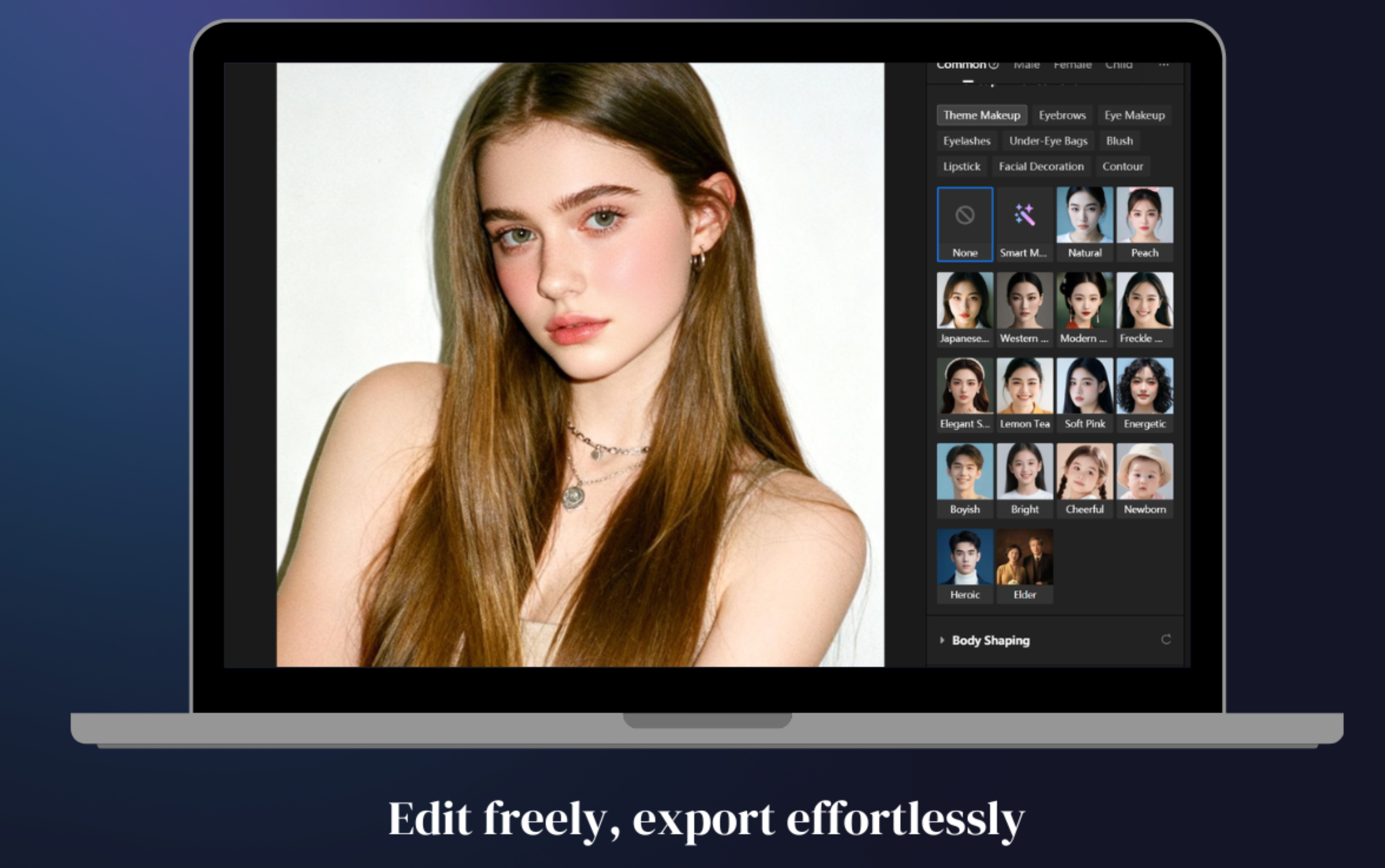
AI Portrait Retouching Features
Professional photographers need more than basic editing tools. They need a complete photo retouching workflow solution that can handle high-volume portrait production with speed, consistency, and precision.
Magimir includes advanced portrait retouching tools that allow photographers to achieve natural, studio-quality results in just a few clicks.
Intelligent Skin Retouching
- Neutral gray skin smoothing
- Moisturizing skin smoothing
- Blemish and acne removal
- Fine line and neck wrinkle removal
- Skin tone unification
- Skin brightening and whitening
Unlike traditional photo editing software, Magimir preserves natural skin texture while improving overall skin quality.
Intelligent Facial Feature Enhancement
- Teeth restoration and whitening
- Eye enhancement and clarity restoration
- Highlight and contour refinement
- Facial detail recovery
- Oil shine removal
These tools help photographers deliver polished portrait images without over-editing.
Intelligent Makeup Enhancement
Magimir allows photographers to enhance makeup styles digitally:
- Eyebrow shaping
- Eye makeup and eyelash enhancement
- Under-eye highlight
- Blush and lipstick adjustments
- Facial decoration and contouring
Perfect for portrait sessions, beauty photography, and commercial shooting workflows.
Intelligent Full-Body Shaping
- Natural full-body contouring
- Neck, arm, and waist slimming
- Height adjustment
- Leg lengthening
All adjustments maintain realistic body proportions and avoid distortion.
Intelligent Hair Editing
- Hair part filling
- Stray hair removal
- Hair smoothing
- Gray hair removal
- Hair color balancing
This helps photographers clean up portraits quickly while maintaining natural hair texture.
Intelligent Eye Adjustment
- Eye brightness enhancement
- Glasses glare removal
Ideal for studio portraits and high-resolution commercial photography.
Facial Reshaping Tools
- Face slimming and head size adjustment
- Face width and chin refinement
- Eyebrow, eye, nose, and mouth proportion adjustment
- Hairline adjustment
- Facial contour smoothing
These features provide precise control for professional portrait retouching.
Clothing Retouching
Magimir includes intelligent tools for clothing wrinkle removal and garment smoothing, allowing photographers to quickly improve wardrobe presentation without reshooting.
Background Editing Tools
- Manual background blemish removal
- Intelligent background cleanup
- Background replacement using smart cutout
Photographers can easily remove distractions, replace scenes, or enhance studio setups.
ID Photo Editing Features
Magimir also supports ID photo production workflows, including:
- ID photo size selection
- Background color replacement
- Symmetric liquefaction for facial and upper body balance
This is especially useful for studios offering passport or document photography services.
Intelligent Color Grading Tools
Magimir offers both manual and intelligent color grading solutions.
Manual Adjustments
- Color temperature
- Tint
- Exposure
- Contrast
Intelligent Style-Based Color Grading
Apply popular portrait styles instantly for consistent visual output across projects.
Official Presets and Custom Preset Support
Magimir includes professional presets designed for different photography scenarios:
- Textured skin portraits
- Natural portrait styles
- Wedding photography
- Children’s photography
- Family portraits
- ID photos
Users can also create custom presets and apply them in batch mode. The “No Effect” option allows instant removal of preset adjustments.
Tethered Shooting Workflow
Magimir supports camera tethering via data cable, enabling photographers to edit images immediately after capture.
Features include:
- Camera information display
- Shooting parameter control
- Import and preview settings
- Shooting effect settings
- File naming automation
- Storage location configuration
This helps photography studios build a faster and more efficient shooting-to-delivery pipeline.
Batch Editing & RAW Workflow Support
Magimir is designed for high-volume photography production.
- Batch import, editing, and export
- RAW format conversion and editing
- One-click editing using custom preset models
- Local and cloud export options
- Image cropping and rotation
AI Intelligent Object Removal
- Remove passersby from photos
- Intelligent object removal
- Clean up cluttered scenes
This feature helps photographers deliver distraction-free images quickly.
Built for Professional Photography Efficiency
Magimir is more than a photo editor — it is a complete photo retouching software solution that helps photographers:
- Save hours of editing time
- Maintain consistent editing quality
- Reduce outsourcing costs
- Handle large client projects more efficiently
If you are looking for a powerful portrait retouching software with batch editing, intelligent color grading, and studio workflow optimization, Magimir is built for your needs.